Free file check · A real person checks every file · $65 minimum
Get a laser cutting quote.
Send your design and we cut, engrave, score, or mark it. A real person reviews every file and sets your actual price before anything is charged — usually the same business day.
Tell us what you're making.
Fill in what you can — anything missing, we will ask in the reply. Best for detailed jobs, business orders, and file fixing.
File basics: Send a vector file — AI, DXF, or PDF (PDF exports are safest). JPG & PNG can’t be laser cut. Got a vector file that needs cleanup? Our file-fixing team makes it cut-ready ($40/hr, only billed after you approve). No design at all? A freelance designer on Fiverr can create one for you. See the full file guide below ↓
Cut-ready, please. Nest your parts on the page by material color and thickness — one file per material group. No overlapping shapes, no blueprint or construction drawings with dimension lines, hidden lines, or annotations. Every line we see, we cut, so anything that isn't part of the actual job needs to come out first. Files that aren't ready can't get an accurate quote — we'll flag them for cleanup or quote our file-fixing rate ($40/hr) on top. See the example below for what a good file looks like.
What happens next
You send your file
Upload it with the form or email it. No file yet? Send a sketch or photo.
A human reviews it
Not an algorithm. We check the design, nesting, and material fit, then send your actual price.
You approve before we cut
Anything to fix, we flag it first. Nothing is charged until you say go.
Good to know
- $65 project minimum.
- Free file check — every file reviewed before we quote, costs nothing.
- File fixing $40/hr — optional, only if your file needs help, only after you approve.
- No setup fees, no material markup.
- 3–5 business days standard; next-business-day rush available.
- Quotes by form or email; shop visits by appointment.
Prefer email or a call?
Email your file to americanlaserco@gmail.com or call 213-866-4738 — ext 2 for cutting & quotes.
File submission guide
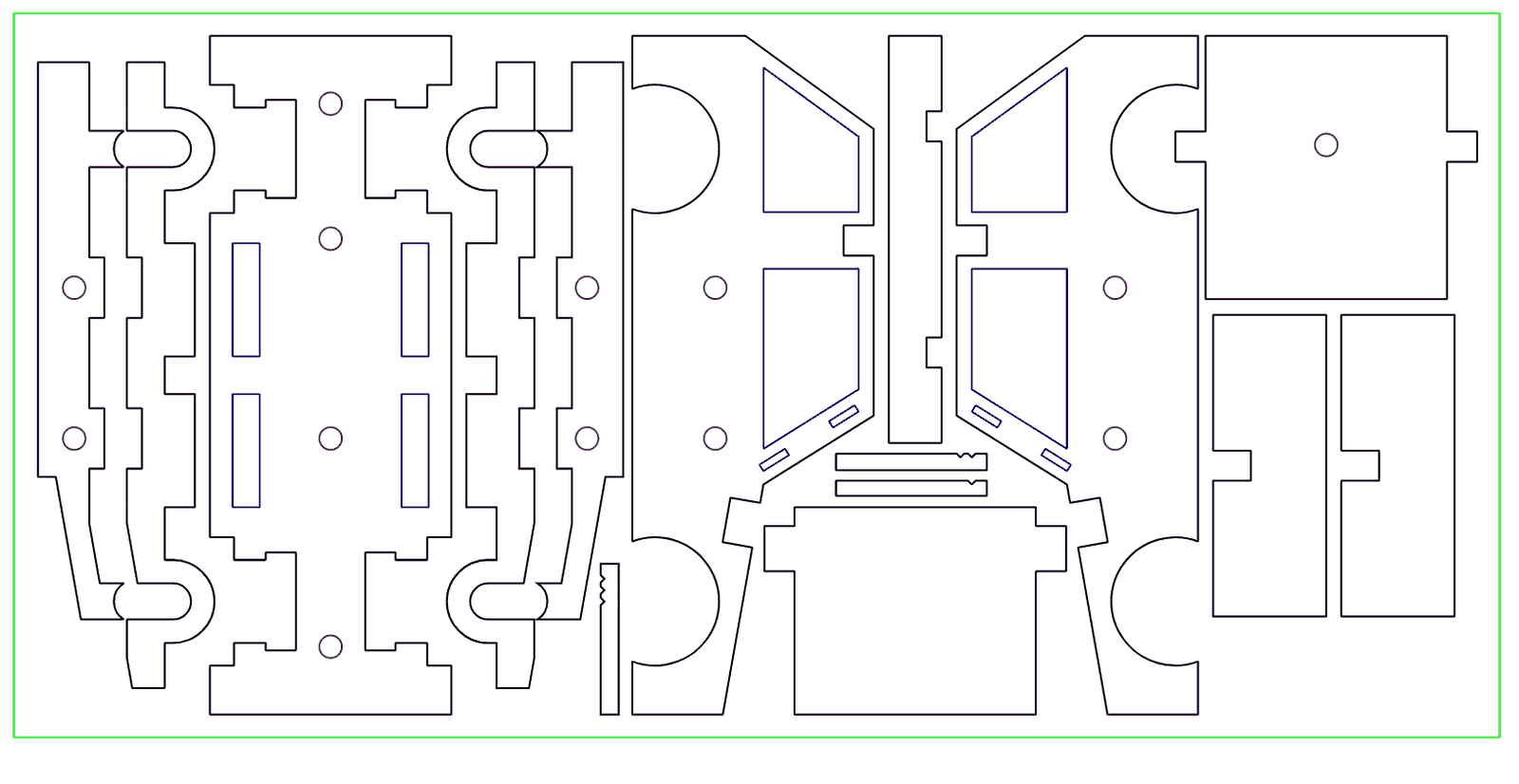
Have a vector file that needs cleanup? Our file-fixing team gets it cut-ready ($40/hr, only billed after you approve). No design at all? Get one made on Fiverr, then send it over.
Accepted file formats
| Accepted | AI, DXF, PDF — vector only |
| Safest export | PDF, in most cases |
| Not accepted for cutting | JPG, PNG, SVG, native software files (raster files work for engraved photos only) |
| No file at all? | Send a photo, sketch, or reference — file fixing is $40/hr, only billed after you approve |
Design setup rules
| Scale | 1:1 — real-world dimensions. We will not auto-scale. |
| Line weight | Hairline or 0.001″. Heavier lines read as a fill, not a cut path. |
| Layers | Single layer. Map cut / score / engrave by color. |
| Hidden objects | Remove all — hidden geometry gets cut anyway. |
| Text | Convert to curves / outlines before exporting. |
Cut vs. score vs. engrave
Map each operation to its own color in your file so we know what you want where:
| Cut | The laser goes all the way through the material. Used for the outline and interior cut-outs. Convention: red. |
| Score | A shallow surface line that does not go through — for fold lines, perforations, decorative depth, alignment marks. Convention: blue. |
| Engrave | The laser removes a thin top layer to mark a surface — logos, text, photos, textures. Vector for line work; raster (PNG/JPG) for photos. Convention: black fill. |
DXF / CAD export settings
| Version | AutoCAD 2023 or earlier |
| Units | Millimeters — switch to mm before exporting (inches can import at 25× scale) |
| Text | Convert to curves / outlines |
| Curves | Export as splines |
| Fills | Unfilled — wireframe only |
| Bitmaps | PNG |
Software-specific export
| Adobe Illustrator | Export as PDF (best compatibility) or AI. Convert text to outlines first. Set strokes to hairline. |
| CorelDRAW | Export as DXF, AutoCAD 2023 or earlier. Wireframe mode, all fills off. |
| AutoCAD / Fusion 360 | Native DXF export. Confirm units are millimeters before exporting. |
| Rhino / Vectorworks | Export DXF as splines, units in mm, text converted to curves. |
Common mistakes & why files get rejected
- Text not converted to outlines — text stays text and can't be cut. Always convert to curves/outlines before exporting.
- Thick stroke weights — lines should be hairline (0.001″ or less). Thick lines cut wider than intended.
- Wrong units in the export — use millimeters. Inches can import at 25× scale.
- Hidden objects left in the design — hidden geometry gets cut. Select all and delete anything you don't want cut.
- Multiple overlapping layers — use a single layer, each operation on its own color.
- Raster artwork sent for cutting — JPG/PNG can't be cut. Vector only. Raster is fine for engraved photos.
If we send a file back before quoting, it is almost always one of the above. We flag it, tell you exactly what to fix, and offer file fixing at $40/hr if you would rather we handle it. Nothing is billed until you approve.
Tips for best results
- Test with a proof. For complex designs, ask for a low-power test cut on cheaper material first.
- Account for kerf. The laser removes roughly 0.003″–0.005″ of material. For precision press-fits, leave a 0.007″ gap minimum.
- Simpler files quote faster. Clean geometry means a faster quote and turnaround.
- Ask about engraving depth. Depth depends on the material — contact us for recommendations.
- For the cleanest acrylic edges, choose cast acrylic over extruded.
What we cut and what we stock.
Stocked materials are ready to go — no ordering, no lead time. Anything else, bring your own laser-safe material or specify in the notes and we will source it.
Stocked — ready to go
- Acrylic, 1/8″ — clear, black, white
- Wood, 1/4″
- Wood, 1/8″
- Mylar (for stencils & templates)
By order — available with a small lead time
- Acrylic in other colors (frosted, fluorescent, mirrored, custom — specify in your notes)
- Other thicknesses on request
- Specialty wood (walnut, cherry, maple, basswood, balsa)
Bring your own
- Leather (natural, vegetable-tanned only)
- Fabric (cotton, polyester, felt, denim)
- Paper, cardstock, museum board
- EVA foam, foam core, cork
- Laser-safe rubber
- Anything else — ask first if unsure
What we will not cut: PVC / vinyl, polycarbonate (Lexan), ABS, fiberglass, MDF, PETG, Delrin, anything with rubber or PVC backing, flame-retardant treated fabrics, glass, or metal. Full materials reference →
5,000+ projects · 1,000+ repairs · 10+ years in DTLA · 4.6 on Google · 59 reviews
Trusted by
NASA JPL · Disney · Warner Bros · Red Bull · USC · UCLA · Caltech · Mattel · U.S. Army · FIDM · Otis · CalArts